
When every outlet keeps its own spreadsheet
Separate spreadsheets give each outlet a different stock figure and slow down every new hire. A shared app gives the whole team one list and a record of every change, and exports to Excel or Google Sheets whenever a report is needed.
In our post on sorting website enquiries, one enquiry was marked High: Aina runs a kitchenware business with three outlets. Each outlet tracks stock, sales and purchase orders in its own spreadsheet. She wants one system by next month.
Her situation is common. The Subang file says there are 42 rice cookers, while another copy says 38. Bangsar is still working from last month’s version, and the total at the bottom of the master file shows #REF! because a sheet was renamed. Before anyone can reorder stock, someone has to work out which number is right.
The cost shows up as products running out at one outlet while another holds spare stock, purchase orders placed twice, and hours spent reconciling files at the end of each month. Every new staff member also needs a tour of which file to open and which ones to ignore.
This post is a concept study: how we would replace those spreadsheets with one shared app for Aina’s business. The business, people and figures are fictional.
Why spreadsheets struggle as a business grows
Spreadsheets are excellent for one person working through numbers. They become harder to manage when several people update copies of the same file at once:
- Copies drift apart. Each outlet saves its own version, and nobody can be sure which one is current.
- Formulas break quietly. Renaming a sheet or inserting a row can break a lookup, and the error spreads into the totals.
- Changes have no history. When 42 becomes 38, the file does not record who changed it or why.
- Access is all or nothing. Anyone who can open the file can change every outlet’s figures.
- Records do not connect. A sale recorded in one file does not reduce stock in another.
One shared app, built around how the outlets already work
The app takes over the day-to-day record keeping, while keeping the columns and terms the team already knows:
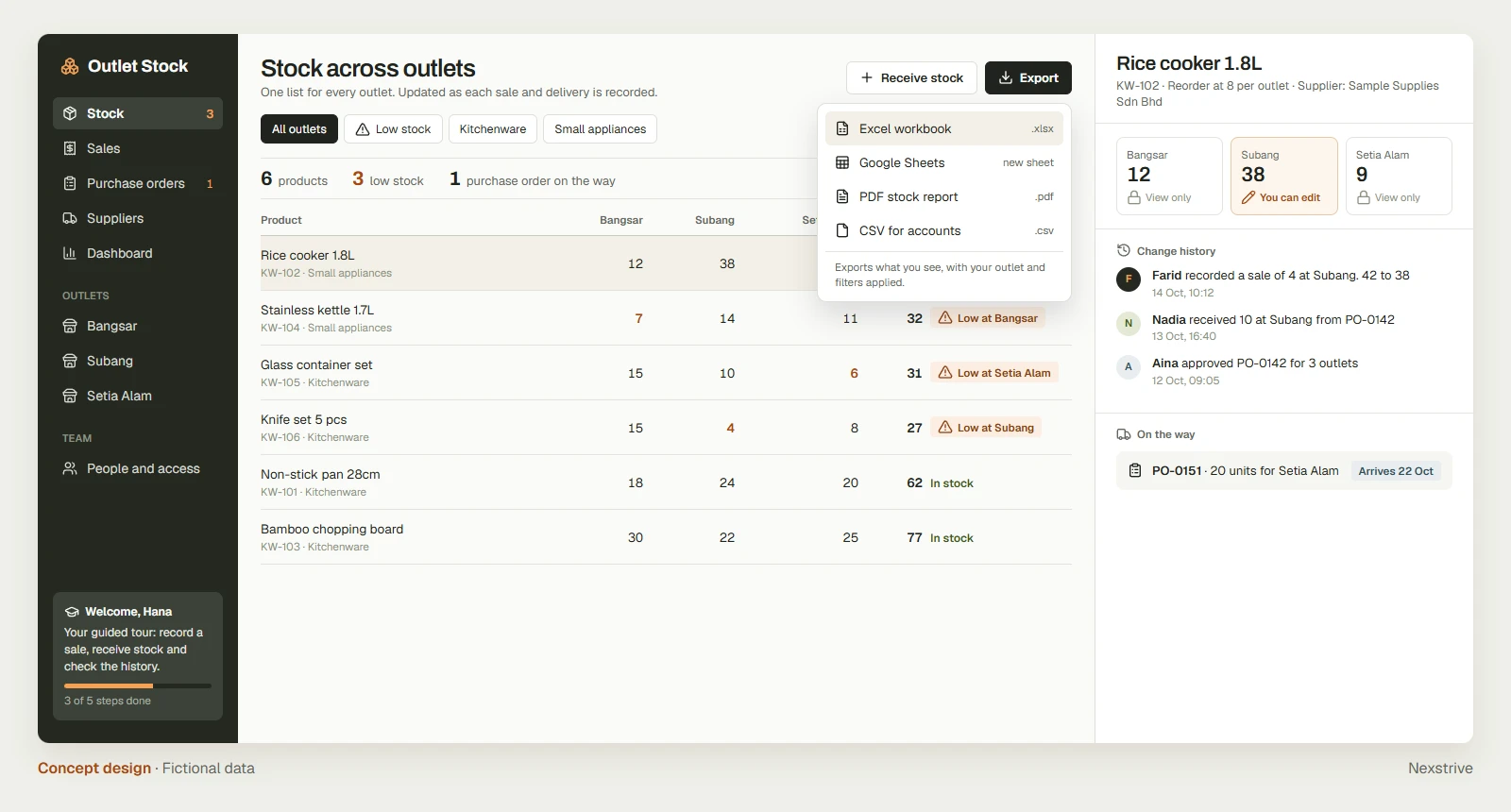
- One stock list for every outlet. Recording a sale or receiving a delivery updates stock immediately, so every outlet sees the same figure.
- Each person edits their own part. The Subang manager edits Subang’s stock and can view the other outlets.
- Every change is recorded. The history shows who changed a figure, what it was before and when, so “42 or 38?” has an answer in seconds.
- Low stock is flagged per outlet, together with purchase orders already on the way.
- New staff learn inside the app. A guided tour walks a new hire through recording a sale, receiving stock and checking the history.
Example: the same morning, before and after
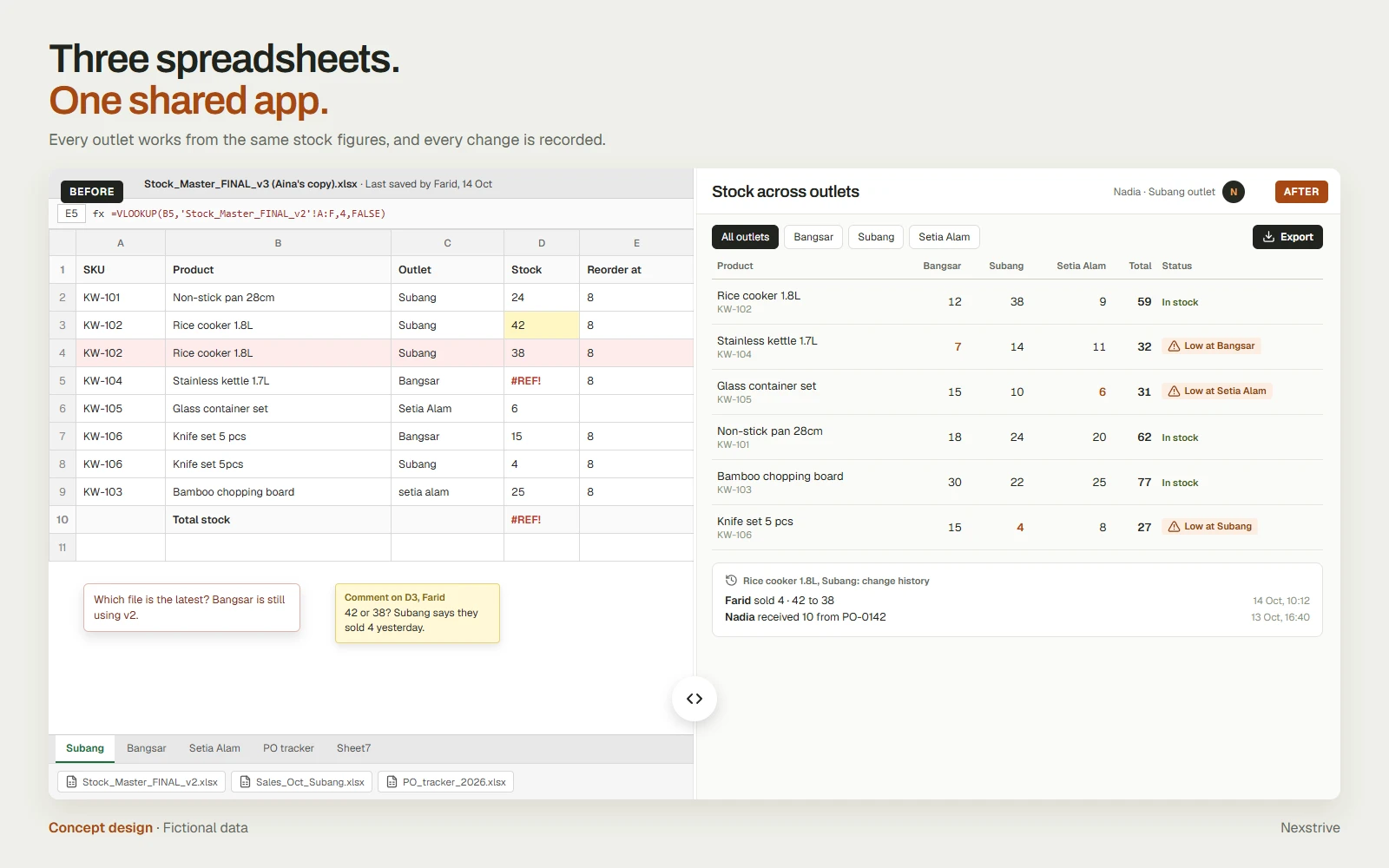
| Question | With three spreadsheets | With the shared app |
|---|---|---|
| How many rice cookers does Subang have? | 42 or 38, depending on the file | 38, after Farid’s sale at 10:12 |
| Who changed the figure? | Ask around the team | Shown in the change history |
| What needs reordering today? | Check three files and compare | One list of low-stock items by outlet |
| Can Hana, the new hire, start today? | After learning which files to use | Yes, with the guided tour |
A dashboard comes with the data
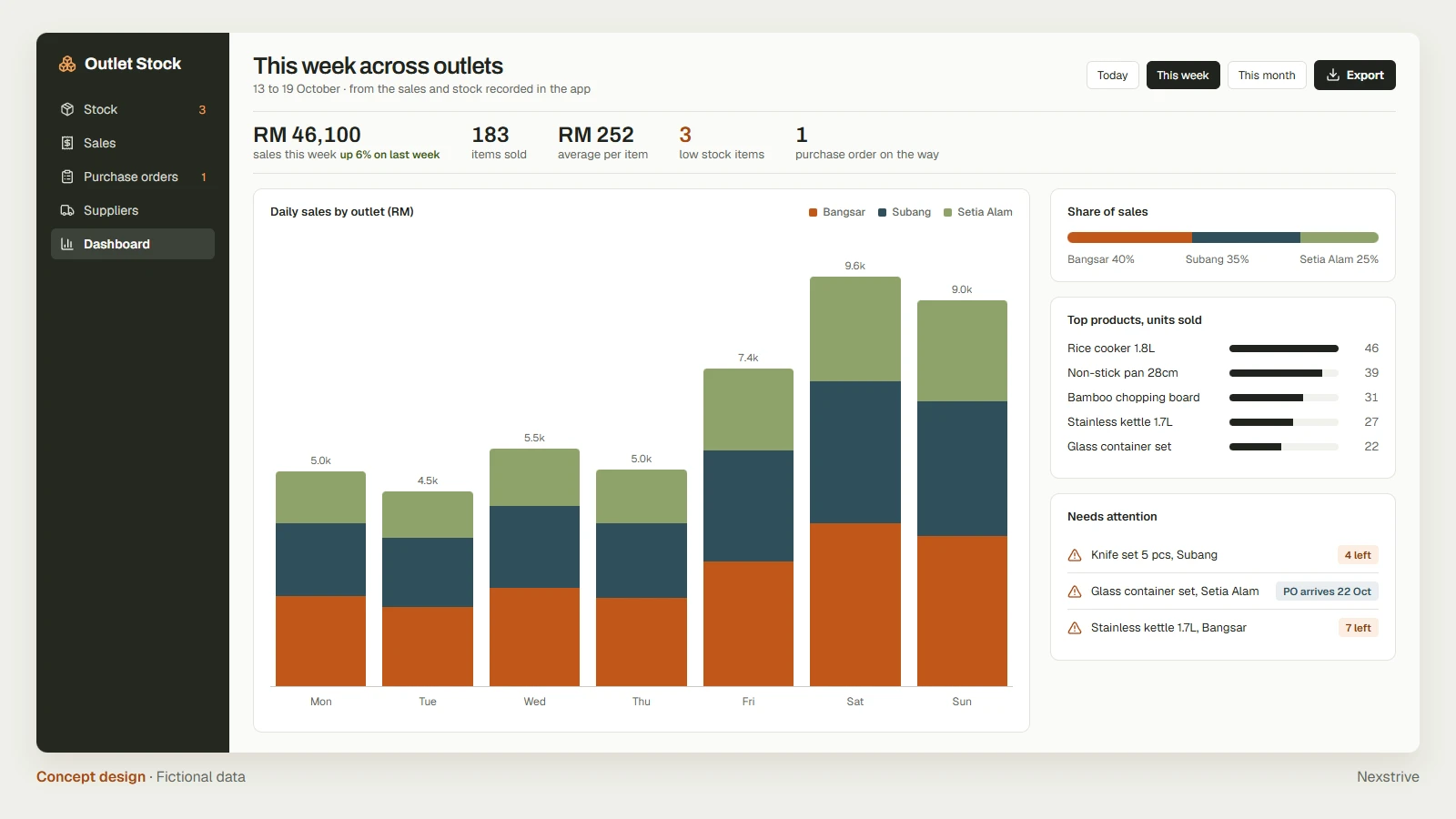
Once every sale and delivery is recorded in one place, a dashboard is simply another view of the same records. Nobody copies figures into a separate file, and the numbers match the stock list because they come from it.
Aina’s dashboard would show daily sales by outlet, the share of sales each outlet brings in, the best-selling products and the stock that needs attention this week.
Keep Excel and Google Sheets for what they do best
The app replaces the shared data entry, not the spreadsheets people like to analyse. Any list can be exported to an Excel workbook, a new Google Sheet, a PDF report or a CSV file for accounts, with the current outlet and filters applied. The owner keeps her pivot tables, and accounts keep their monthly workbook.
Where a business uses Bukku for accounting, the app can also pass approved records into it, as in our project connecting spoken orders to Bukku.
Where to start
The first version does not need to replace every spreadsheet. A practical starting point:
- Pick the spreadsheet that causes the most questions. For Aina, that is stock.
- List who updates what. Each outlet updates its own stock; the owner approves purchase orders.
- Keep the columns that matter, and drop the ones nobody uses.
- Write down the reports that must still come out, so the exports are built in from the start.
Sales, purchase orders and the dashboard can then follow, using the same records.
Apply the approach to other businesses
The same approach suits any team that shares spreadsheets across people or branches:
- Clinics with several branches: appointments and treatment records in one place. Access would be limited by role, with a full history of who viewed or changed a record.
- Contractors: job sheets, materials and site progress. Site staff would need a phone-friendly screen that works with a weak signal, and photo uploads.
- Tuition centres: enrolment, attendance and fees by branch. Parents’ contact details would need consent records and limited access.
- Wholesalers and distributors: orders, stock and deliveries, with approved invoices passed to the accounting system.
Each adaptation starts from the spreadsheets the team already uses: who fills them in, what they record and which reports the business relies on.