
When every website enquiry looks the same
A ready buyer with a deadline can wait behind a routine question because every enquiry arrives with the same subject line. Our website sorts each enquiry by topic and priority, shows why, and sends a reply that matches the request.
Most small businesses receive website enquiries in one inbox, each with the same subject line. A client who needs a system by next month and has a budget in mind sits between a routine product question and a request for a price list. Someone has to open each message to find out which one matters today.
That delay has a cost. A buyer with a deadline often contacts several suppliers and works with the first one that replies with something useful. The visitor’s first reply is usually the same generic thank-you, whatever they asked.
We added a sorting step to the enquiry form on this website. Each enquiry is labelled with its topic and a priority before anyone reads it, the reasons are written into the email, and the visitor receives a reply that matches their request.
How each enquiry is sorted
The website looks for a small number of signals that matter to us:
- What the visitor wants. Custom work, such as an app, a dashboard or a website, is treated differently from a question about one of our products. If the visitor leaves the topic blank, it is read from the words in the message.
- A phone number. A visitor who leaves a number usually expects a call.
- A timeframe. Phrases such as “next month”, “urgent” or “minggu depan”.
- A budget. An amount such as “RM 15,000”, or a mention of a budget.
Together these set the priority: High, Normal or Low. The same enquiry always receives the same result, and every result lists the reasons behind it. Nothing is discarded or delayed. A Low enquiry is delivered in exactly the same way as a High one.
Example: three enquiries in one morning
The enquiries below are fictional. The priorities, reasons and replies are the actual output of the website’s sorting rules for these messages.
| Enquiry | Priority | Reasons shown | Reply sent |
|---|---|---|---|
| Aina: “We run three outlets and track stock, sales and purchase orders in separate spreadsheets. We need one system where managers update stock and see daily sales by outlet, with low-stock alerts, by next month. Budget about RM 15,000.” Phone number given | High | Custom work, phone number, “next month”, “RM 15,000” | Asks for examples of how the work is done today |
| Daniel: “Our company website is out of date and hard to update. Could you quote for a new one?” Topic left blank | Normal | Custom work. Topic read as Website | Asks for examples of how the work is done today |
| Mei: “How do I move my Knotpad notes to a new laptop?” | Low | Product question, nothing else | Links to the Knotpad help pages |
The business sees the priority and topic in the subject line, so the inbox can be read in order of importance without opening every message.
![Notification email with the subject [High] Dashboard or business system: new enquiry from nexstrive.tech, listing four reasons: custom work, a phone number, the timeframe next month and the budget RM 15,000](/blog/enquiry-owner-email.webp)
A reply that moves the conversation forward
The acknowledgement each visitor receives depends on the topic. A request for custom work asks for examples of how the work is done today, such as a spreadsheet, a form or a few screenshots, so the first conversation can start from the real process. A Bukku question links to our Bukku support page. A product question links to that product’s help pages, which may answer it before we reply.
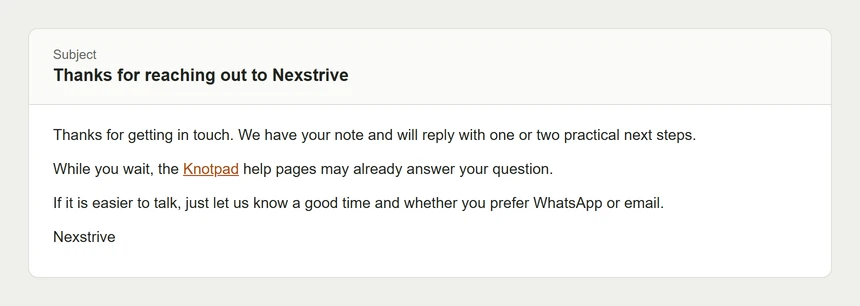
Sorting happens only after the enquiry is safely received. The form confirms an enquiry once it has been saved or emailed to us, and tells the visitor plainly if neither worked.
Taking it further: an enquiry dashboard
Email works well while enquiries are few. As the volume grows, the same sorting could feed a dashboard where a team works through enquiries together. The design below is a concept, shown with fictional enquiries.
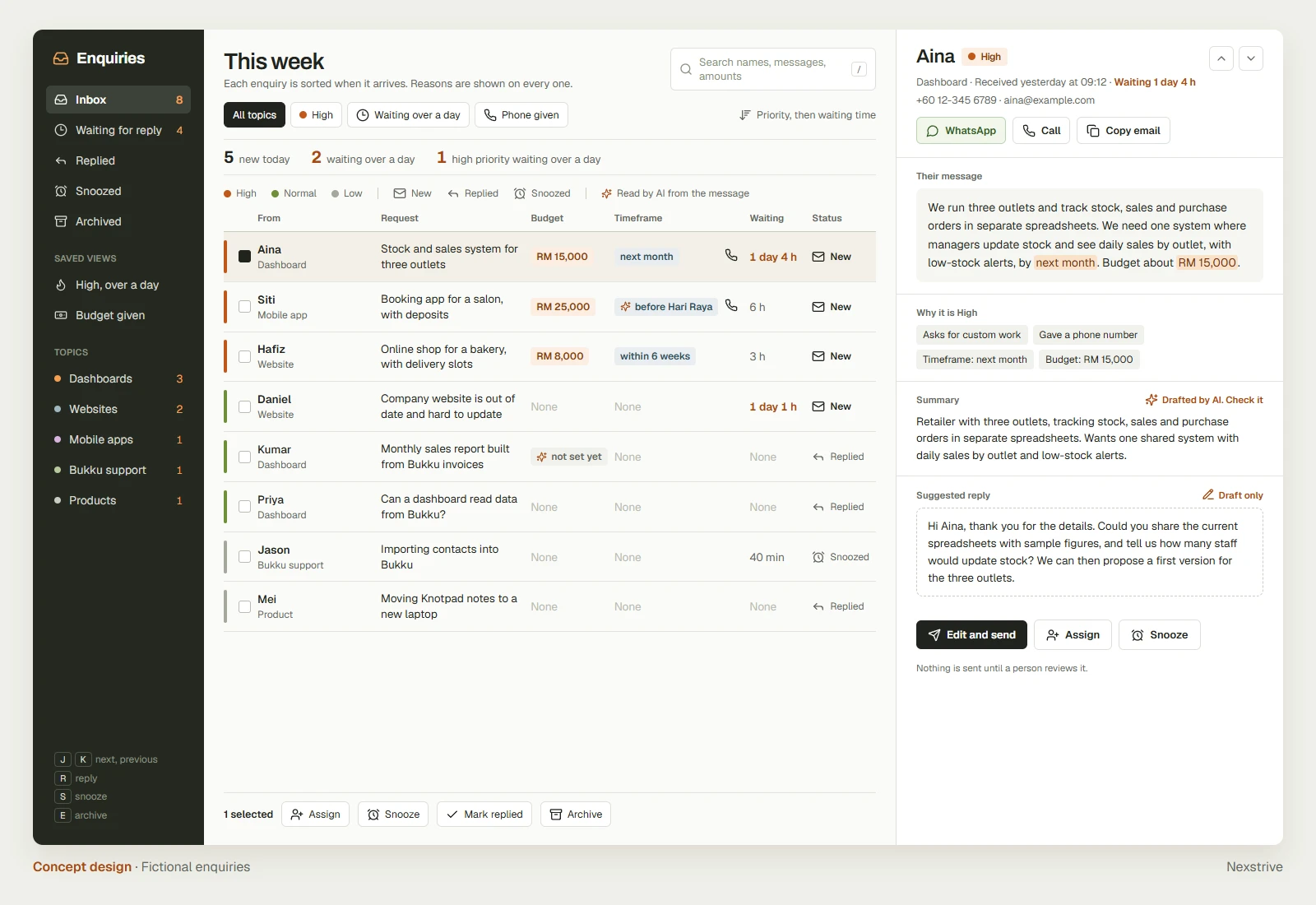
The concept is designed for a quick morning review:
- Priority at a glance. A coloured bar marks each enquiry as High, Normal or Low, and the list is ordered by priority and then by how long each enquiry has waited. Any enquiry left for over a day has its waiting time highlighted.
- The details that matter, in the list. Budget and timeframe are picked out of each message and shown in their own columns, with a phone icon when the visitor left a number. The team can compare enquiries without opening them.
- Status by icon. New, Replied and Snoozed each have an icon, and saved views such as “High, over a day” or “Budget given” open the right list in one click.
- Work in batches. Select several enquiries to assign, snooze, mark as replied or archive them together, or move through the list with the keyboard.
Opening an enquiry shows the visitor’s exact message, with the phrases behind the priority highlighted, so nothing is lost in a summary. WhatsApp, call and copy-email buttons sit beside the contact details, and the reasons for the priority are listed underneath.
In the concept, AI helps with the reading, while people keep the decisions:
- A short summary of each message, labelled as drafted by AI, beside the original message so the reader can check it.
- A suggested topic when the visitor left it blank and the rules find no clear match.
- A draft reply that a person edits and sends. Nothing is sent without a person reviewing it.
Turn more of each message into data
The rules on our website match words and amounts, which keeps every result predictable. An AI step can go further and read what the visitor meant, turning more of each message into data the dashboard can use:
- “We have no budget yet” becomes budget not set, so it is not counted as a stated budget.
- “Before Hari Raya” becomes a deadline, even though the message contains no date.
- Quantities, locations, existing systems and the number of users can be captured in the same way, ready to filter and compare.
In the concept, each value read by AI is marked with its own symbol and shown beside the words it came from. The team can confirm it at a glance, and the confirmed values then feed the same priority rules, so the order of the inbox stays consistent and explainable. Reminders for enquiries left unanswered fit naturally into the same dashboard.
Dashboards like this are one of the systems we build for clients. An enquiry dashboard follows the same approach as an operations or sales dashboard: start from the information a business already receives, and present it so the team can act on it quickly.
Apply the approach to other enquiries
The same sorting can be adapted to other businesses that receive requests through a website or a form:
- Clinics and wellness centres: requests mentioning a preferred date could go to the front desk first. The rules would need to avoid any medical judgement and route only by appointment details.
- Property agents: a budget, an area and a move-in date could mark a serious buyer or tenant. The vocabulary would need to match local property terms and price formats.
- Wholesalers and suppliers: quantities and delivery dates could separate new orders from support questions. Product codes and minimum order rules would need to be added.
- Tuition centres and training providers: an intake month or a course name could route the enquiry to the right coordinator. Course names and schedules would need to be kept up to date.
Each adaptation starts from the same sorting approach, set up with the business’s own vocabulary and team. It can also route enquiries to a named person or a WhatsApp group and send reminders for enquiries left unanswered. AI steps follow the checks described in our post on reviewing AI output.