
When an AI coding change breaks a working feature
An unwanted coding change can become difficult to undo when it is mixed with your own unfinished work. Use RepoYard to review the edits and return to a checkpoint taken before the session.
You ask a coding assistant to improve a checkout form. It changes several files, but testing reveals that an existing part of the checkout no longer works. You also had unfinished work in the project before the session began.
Discarding every uncommitted change could remove your own work. Asking the assistant to reverse its edits requires another round of changes, which you then need to check.
RepoYard provides local checkpoints so you can return to a recorded project state. A checkpoint taken before the session can include your unfinished work, giving you a recovery point beyond the last Git commit.
Record the starting point
In RepoYard, open the repository’s Overview and find Safety net. Checkpoint now records the current working files, including untracked files that Git does not ignore.
RepoYard also attempts to create a checkpoint before launching a coding command-line session through its supported controls. Check that the checkpoint appears before relying on it. The repository needs Git and at least one commit, and sessions launched elsewhere do not receive a checkpoint from that launch.
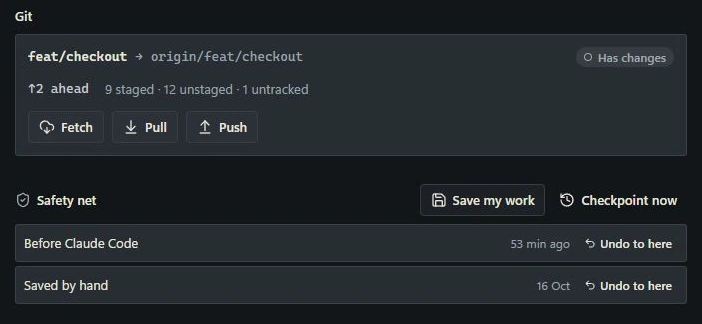
For the checkout example, suppose you had already revised the delivery instructions before asking the assistant to change the coupon field. A checkpoint taken at that point records those instructions alongside the rest of the working files. They do not need to be committed first to be included.
Review what changed before choosing recovery
Pause the coding session, then open Changes. Inspect the affected files and their differences. A file comparison shows what was edited; running the relevant checks establishes whether the feature still behaves as intended.
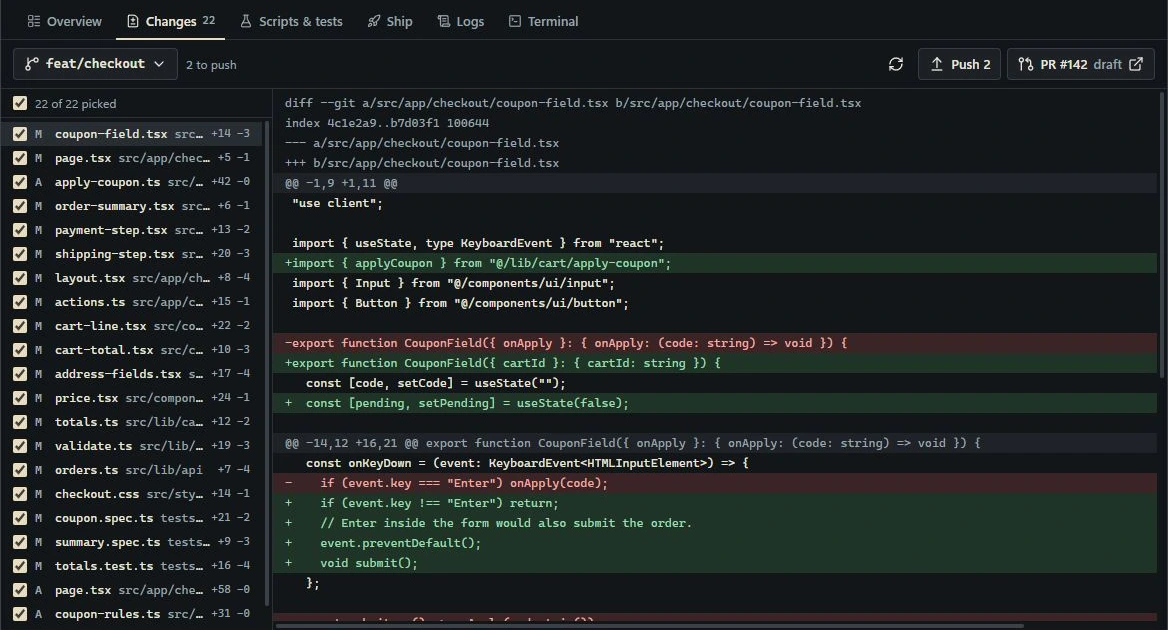
Decide whether to keep part of the result or return to the earlier state. Copy any later work you want to retain before restoring. A checkpoint restore applies to the project state, so it can also undo useful edits made after that checkpoint.
Return to the selected checkpoint
In Safety net, choose Undo to here beside the checkpoint from before the session. Read the confirmation before proceeding.
The current restore returns changed or deleted files to their saved contents and removes files created after the checkpoint, except ignored files. If commits were made after the checkpoint, it also moves the local branch back to the commit associated with that checkpoint.
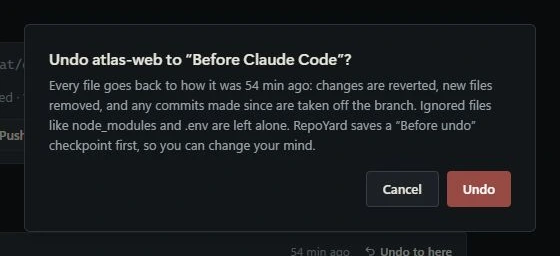
RepoYard saves a Before undo checkpoint before restoring, providing a way back if you reconsider. After recovery, inspect Git status and run the relevant feature checks again. Restoring files establishes an earlier code state; testing confirms whether that state meets your requirements.
In the illustrative checkout scenario, returning to the pre-session checkpoint would retain the delivery instructions recorded there and remove the later coupon edits. The next attempt can begin from that recorded state, without reconstructing the earlier files from memory.
Keep the recovery boundary clear
Checkpoints are local and retained in a limited history. Ignored files, such as a typical .env file, are excluded. A restore cannot reverse a database migration, an invoice sent through an API or a deployment. Changes already shared with other people also need a coordinated Git recovery plan.
Continue making regular commits and backups. Use checkpoints for a local return point while testing changes, and verify that the checkpoint you need exists before beginning the session.
Explore RepoYard, our Windows workspace for repositories, development services and coding sessions. For the record to leave after reviewing a change, read what to save before closing an AI coding session.