
Reconcile your bank account in Bukku every month
Match each statement line in Bukku, create missing bank charges, find the cause of a difference and carry timing items forward, with a fictional month.
A bank reconciliation left for a quarter means searching through hundreds of statement lines for one missing fee. Done each month, it usually fits in one sitting, and a duplicate or wrong amount is found while the people involved still remember the transaction.
This guide covers the monthly routine in more detail than Your first month-end close after moving to Bukku. It uses the same fictional trading business, now reconciling February 2027.
Choose how to bring in the statement
In Bukku, go to Bank, then Accounts, and choose Reconcile on the account. Which method to use depends on your bank and the file it gives you.
| Method | What you need | How it works |
|---|---|---|
| Manual Reconciliation | The statement date and closing balance | You tick each transaction that appears on the statement |
| SmartRecon | A PDF e-statement, or a CSV file for some banks | Bukku reads the file and suggests matches by date, amount and description |
| Maybank bank feed | A linked Maybank account | Transactions arrive daily. Up to 3 accounts, and up to 3 months back |
For SmartRecon, Maybank statements are read as PDF, Public Bank as PDF or CSV, and CIMB, UOB and Hong Leong Bank as CSV. Universal SmartRecon reads PDF e-statements from most other Malaysian banks. SmartRecon also accepts a statement arranged in Bukku’s own CSV template.
Match each statement line
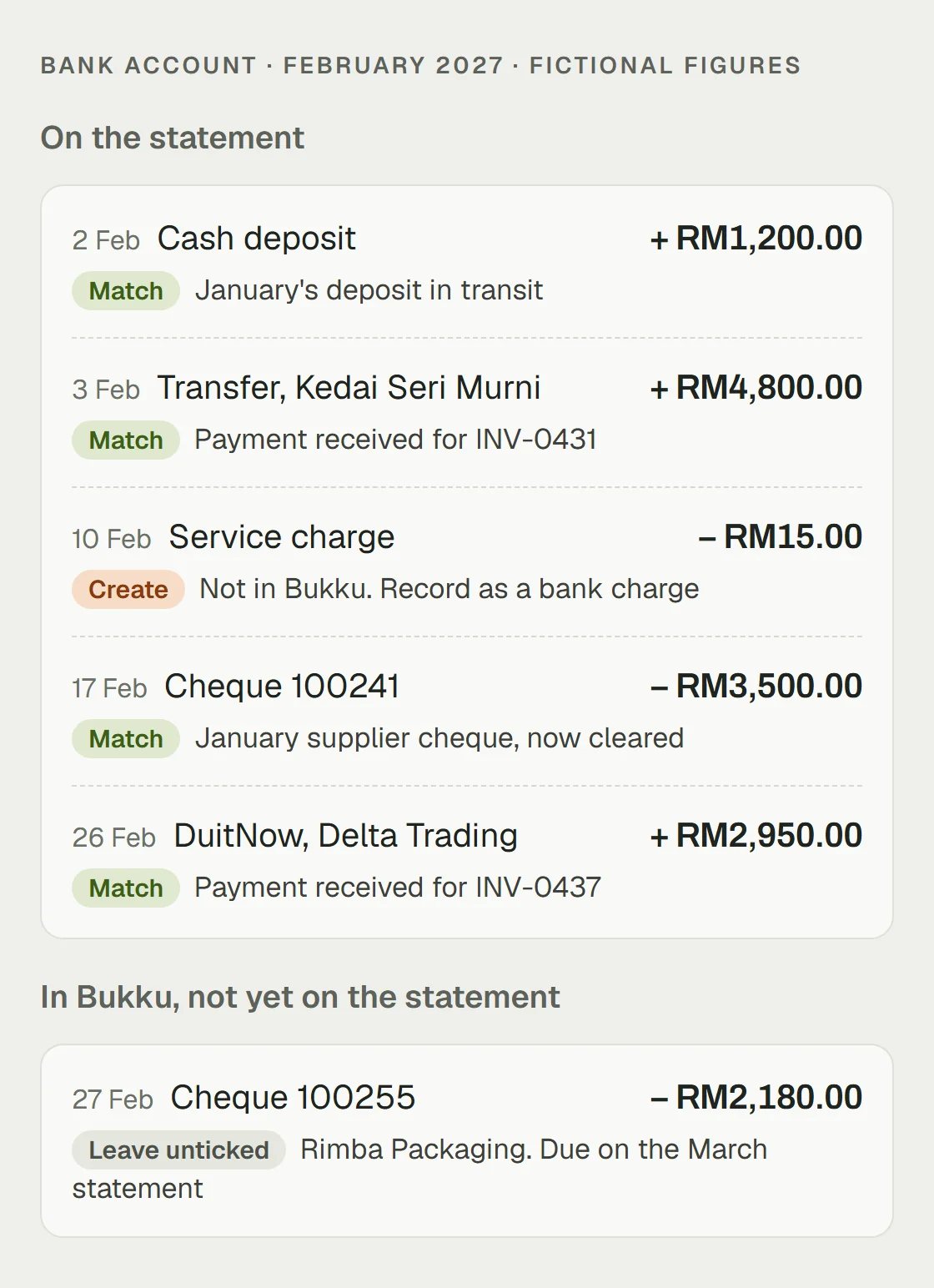
SmartRecon sorts the statement into three tabs: Unmatched, Matched with Adjustment and Matched. Work through Unmatched first. For each line, choose Match to link it to a transaction already in Bukku, or Create to record one that is missing, such as a bank charge. Split & Match and Merge & Match handle lines that do not pair one to one.
With Manual Reconciliation, you enter the Statement Date and Statement Balance, tick each transaction, and use + Create for anything missing. In both methods, choose Save once the difference is zero.
Find the cause of a difference
If the balances do not agree, Bukku shows a Difference. The amount itself often points to the cause.
| What the difference looks like | Likely cause | Fix |
|---|---|---|
| Equal to one statement line | A transaction is missing from Bukku, or was recorded in another bank account | Create it, or move it to the right account |
| Twice the amount of one transaction | A payment was recorded as a receipt, or the reverse | Edit the transaction so it goes the right way |
| Divisible by 9, such as RM90 | Two digits swapped, such as RM540 entered as RM450 | Correct the amount on the transaction |
| Equal to a transaction already matched | The same payment was entered twice in Bukku | Delete the duplicate |
Fix the transaction where it was recorded, such as the payment in Sales, so your customer and supplier balances stay correct.
Carry timing items forward and correct mistakes
A transaction recorded in Bukku but not yet on the statement stays unticked and appears again next month. In the example, the RM3,500 cheque from January cleared on 17 February, and the RM2,180 cheque written on 27 February should clear in March. Follow up any item still open after a month.
| Timing item | In Bukku | On the statement |
|---|---|---|
| Cash deposit | 31 January | 2 February |
| Cheque 100241 | 29 January | 17 February |
| Cheque 100255 | 27 February | Not yet, expected in March |
If you ticked the wrong line after saving, open Reconcile again and select the statement date. Use the bin icon to clear that transaction, choose Save, correct the transaction, then reconcile it again. To redo a whole statement date, choose Delete. Bukku removes the reconciliation for that date but keeps the transactions themselves.
What this guide does not cover
Bukku’s reconciliation guides do not cover credit card or e-wallet accounts, so confirm those with Bukku before you rely on the same steps. Your first reconciliation after setup has its own guide on opening balances. Limits on bank feeds and other features depend on your Bukku plan.
Get help with your reconciliation
If your bank accounts have not been reconciled for a few months, we can work through them with you, with the scope agreed before work begins. Read about our Bukku support or contact us.