
Your first month-end close after moving to Bukku
Check your first month in Bukku in four steps. Reconcile the bank, tie receivables and payables to the Trial Balance, fix errors at the source, then lock it.
The first month in new accounting software is where small setup mistakes show. A payment that never reached its invoice, or a bank charge nobody recorded, is easy to fix in February and slow to trace in December.
This guide follows the fictional trading business from What to prepare before moving your accounts to Bukku through its first close at 31 January 2027. Do the four steps in order: each one relies on the figures from the step before.
Reconcile each bank account to the statement
Start with the bank, because every other check depends on receipts and payments being recorded correctly.
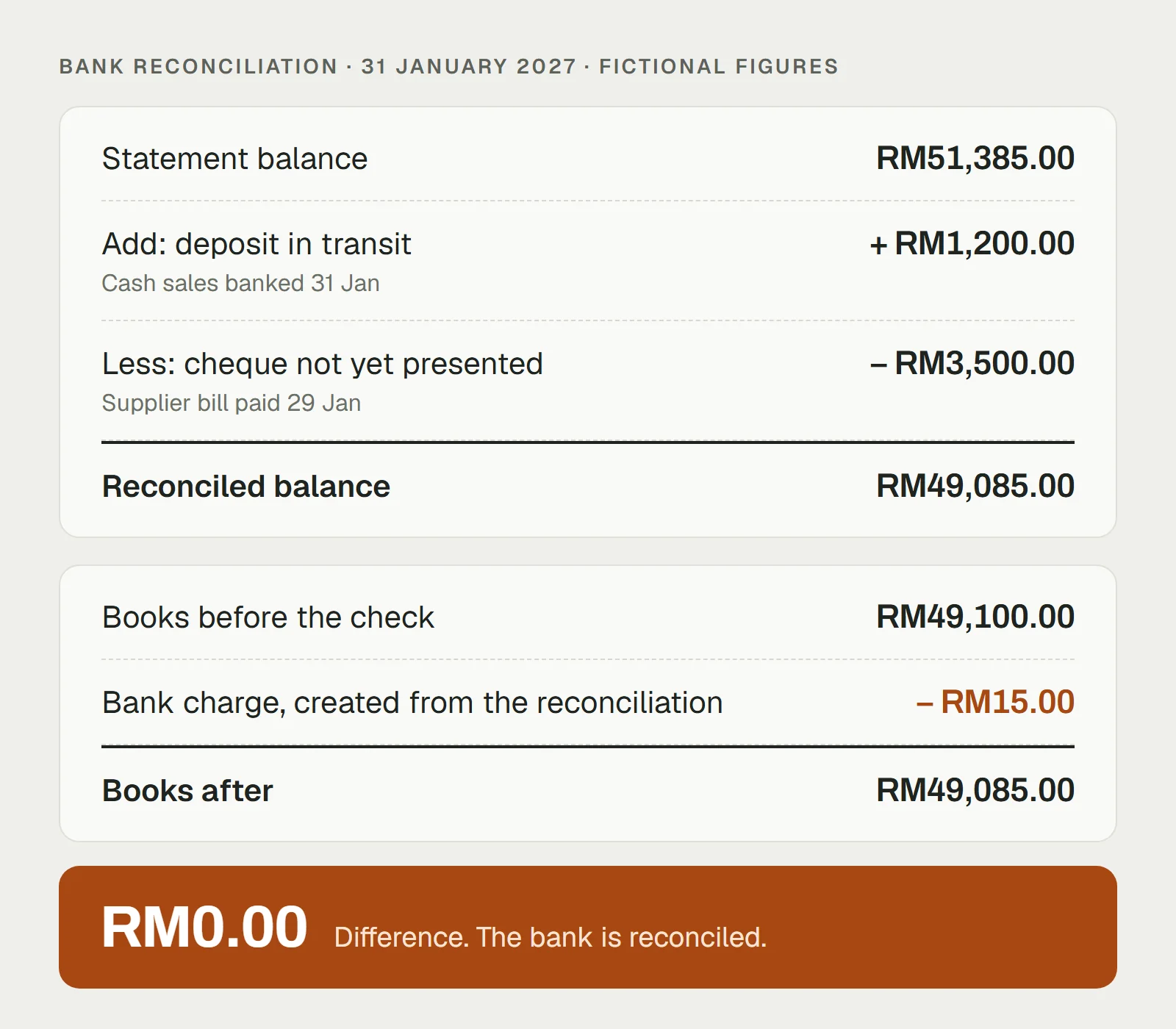
In Bukku, a manual reconciliation asks for the statement date and closing balance. You tick each transaction that appears on the statement until the difference is zero. If the statement shows something Bukku does not have, such as a bank charge, choose Create to record it from the same screen. If you would rather not tick by hand, SmartRecon matches an uploaded PDF statement by date, amount and description.
Anything left unticked is a timing difference: a cheque the supplier has not banked, or a deposit made on the last day. Note each one. It should clear on next month’s statement.
Tie receivables and payables to the Trial Balance
Run the Trial Balance at 31 January, then the Aged Receivables and Aged Payables reports at the same date. The total of each aged report should equal its account on the Trial Balance. When they differ, look for an entry that changed the account without touching an invoice or bill.
| Account | Trial Balance | Aged report total | Difference |
|---|---|---|---|
| Receivables | RM27,050 | RM34,250 | RM7,200 |
| Payables | RM12,640 | RM12,640 | None |
In the example, a customer’s RM7,200 payment was recorded as a journal entry. The receivables account went down, but invoice INV-0412 still shows as unpaid, so the customer would receive a reminder for money already paid.
Fix each error where it was made
Correct a mistake in the module it came from, not with an extra journal. Bukku’s guidance is to correct receivables through Sales, so the list of open invoices and the Trial Balance stay in agreement.
| What you see | Likely cause | Fix |
|---|---|---|
| Aged receivables higher than the Trial Balance | Payment entered as a journal entry | Delete the journal, then record the payment against the invoice in Sales |
| Opening invoices appear twice | Unpaid invoices entered in the opening balance and again under Sales | Delete the copies under Sales and keep the opening balance entries |
| Bank difference equal to a fee | Charge on the statement not recorded | Create it from the reconciliation screen |
| Uncleared cheque older than a month | Cheque lost or never banked | Confirm with the supplier before cancelling or reissuing |
After each fix, run the two reports again. The close is ready when the bank difference is RM0.00 and both aged reports match the Trial Balance.
Lock January once the figures agree
A locked period stops anyone posting into a month you have already checked. In Bukku, go to Control Panel, then Company Settings, then Lock Accounting Period. Set the lock date to 31 January 2027 and choose a passcode of digits only.
Anyone with the passcode can still change a locked transaction, and so can users given the Bypass Lock Period special right. Keep the passcode with the person who signs off the month. Locking periods is available on the Seed plan and above.
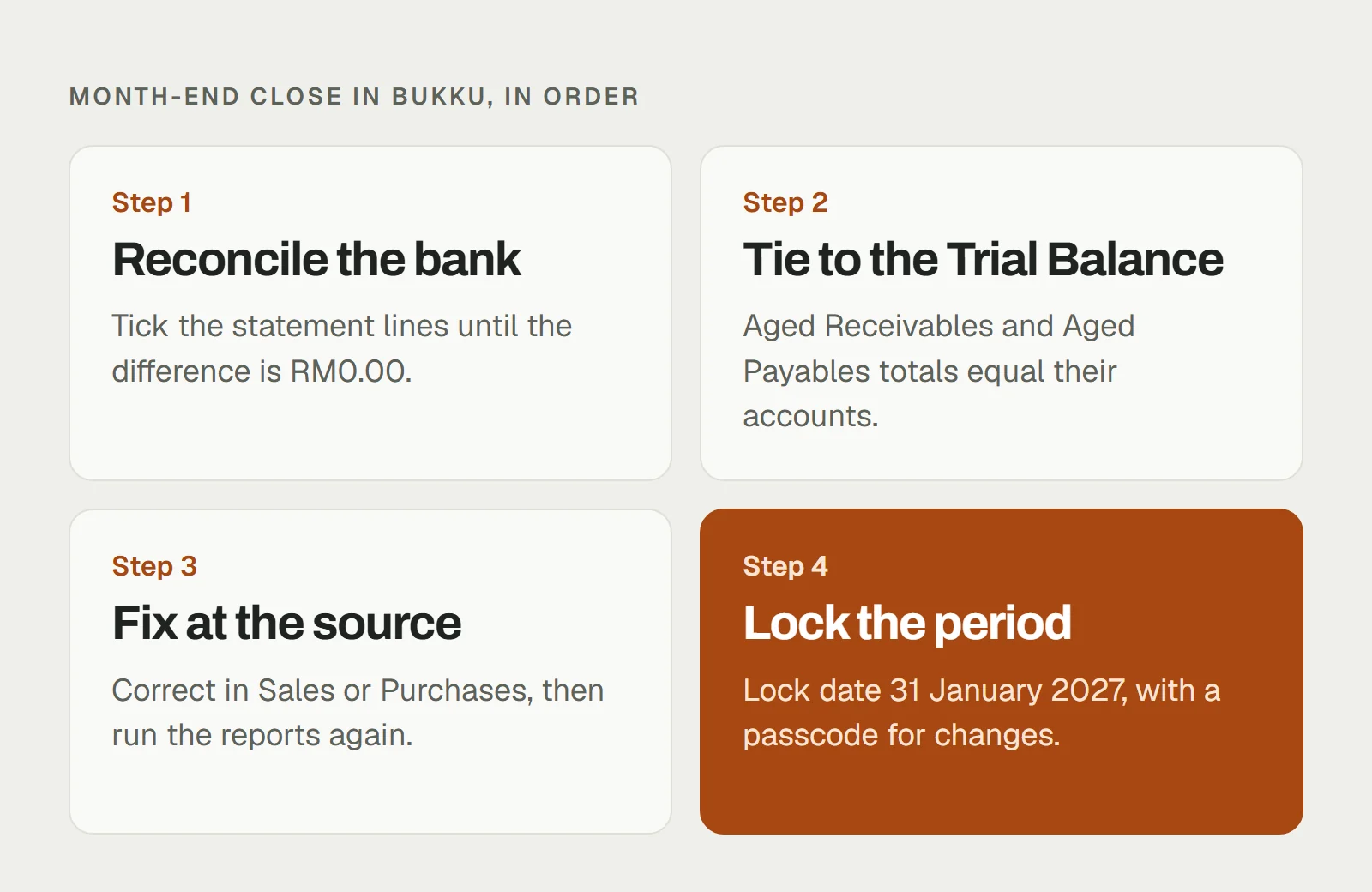
Repeat the same order at the end of each month. Once the setup errors are gone, the close usually comes down to the bank reconciliation and a quick look at the two aged reports.
What this close does not cover
These steps check that your records agree with each other and with the bank. They do not prepare SST returns, payroll contributions or e-Invoice submissions, and they do not replace year-end adjustments from your auditor or tax agent. For screen-by-screen instructions, see the Bukku help centre.
Get help with your first close
If you would like a second check on your first month, we can review the reconciliation and the aged reports with you, with the scope agreed before work begins. Read about our Bukku support or contact us.