
What to prepare before moving your accounts to Bukku
Prepare the cut-off date, closing figures and master lists before moving your accounts to Bukku. A year-end checklist from our work as a Bukku partner.
A move to new accounting software rarely goes wrong on the first day. The problems appear a few weeks later: a customer’s payment has no invoice to match against, the first bank reconciliation starts with an unexplained difference, or receivables show twice because unpaid invoices were entered in two places.
Most of these issues trace back to preparation. When the cut-off date, the closing figures and the master lists are ready before anything is entered, the first month in Bukku starts from balances that agree with the old system.
Nexstrive started by helping businesses with cloud accounting and Bukku, and we still support accounting clients today. This guide sets out the preparation we complete with clients before they move.
Choose the cut-off date first
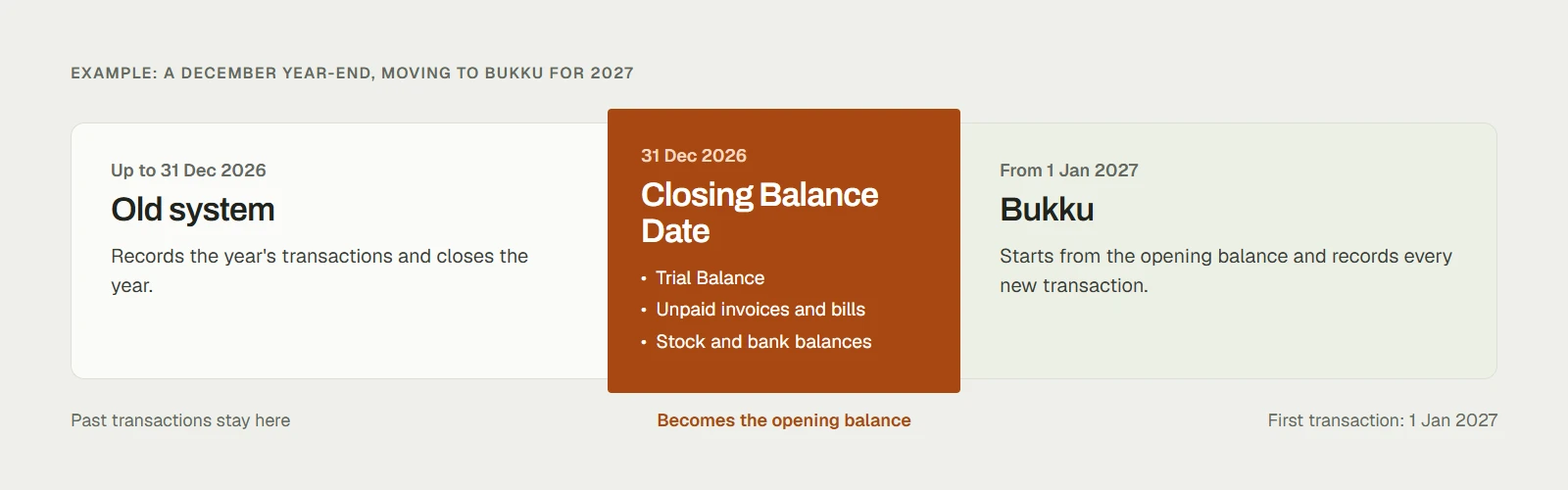
Every step depends on the date of the closing figures you bring across. In Bukku, this is the Closing Balance Date, normally the “as of” date of your last closing Trial Balance at the financial year-end. The following day is your first transaction date in Bukku.
For a business with a December year-end that plans to start 2027 in Bukku:
- Up to 31 December 2026: transactions remain in the old system, which closes the year.
- Closing Balance Date: 31 December 2026.
- First transaction in Bukku: 1 January 2027.
If you switch partway through a year, keep the last year-end as the Closing Balance Date and import the current year’s transactions up to the switch. The full year can then be closed in Bukku.
Audited figures often arrive months after the year-end. Bukku accepts provisional opening balances, which you can update when the final figures are ready. Finalise the receivables and payables lists early, because payments can be matched against opening invoices and bills only after those balances are correct.
Gather the reports from the old system
Before entering anything, export these from the old system as at the cut-off date:
- Trial Balance or Balance Sheet, the source of every opening figure.
- Unpaid customer invoices, each with its number, date and outstanding amount. Their total should equal the receivables balance.
- Unpaid supplier bills, listed the same way. Their total should equal the payables balance.
- Stock on hand by product and location, with quantity and cost, if you track inventory.
- Bank statements for each account at the closing date, with any cheques or transfers that had not yet cleared.
- Lists of customers, suppliers, products and services, and the chart of accounts.
Before importing, total the receivables, payables and stock lists and compare each with its Trial Balance line. Differences are easier to trace in the old system than to correct in both systems after go-live.
Import the lists in order
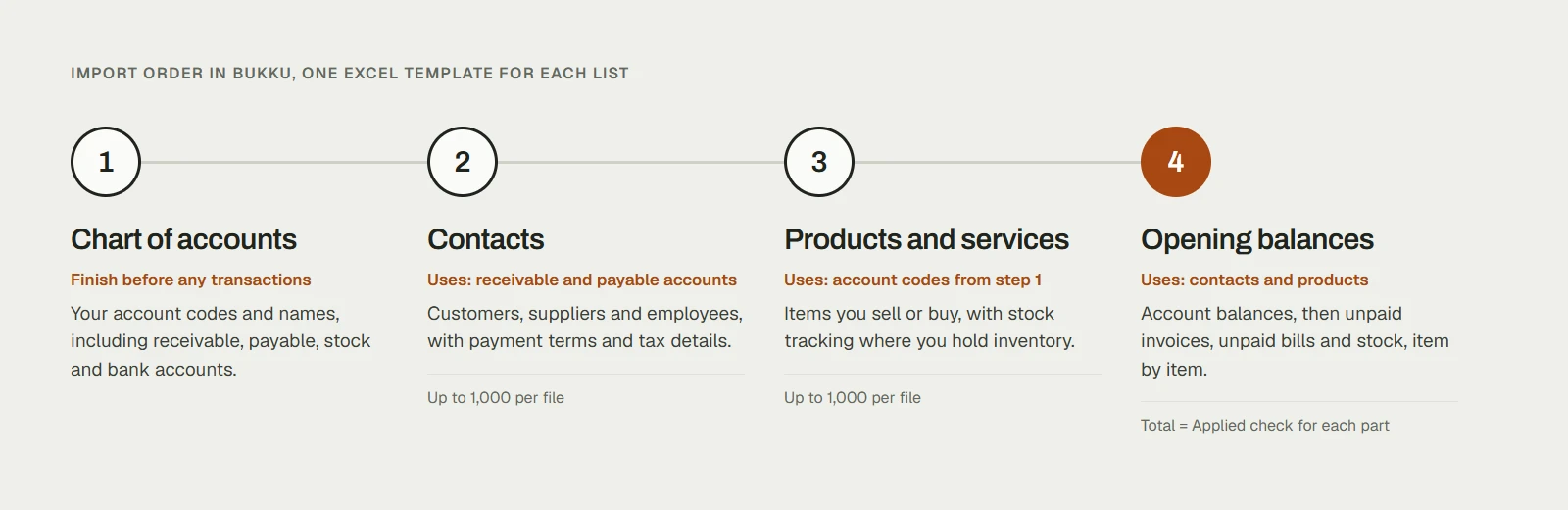
Bukku has an Excel import template for each list. Import them in this order:
- Chart of accounts.
- Contacts: customers, suppliers and employees.
- Products and services.
- Opening balances.
Each step refers to the one before it. A contact needs its receivable or payable account, and an opening invoice needs its customer to exist.
Template requirements:
- Contacts and products import up to 1,000 rows per file, so a longer list needs splitting.
- A row whose name already exists in Bukku updates that record instead of creating a new one.
- Yes and No columns accept only “Yes” or “No”.
- Payment terms, contact groups, product groups and locations need to exist in Bukku before an import refers to them.
- Finish the chart of accounts before recording any transactions, so every later entry uses the final account codes.
Enter unpaid invoices and bills once
Bukku’s Opening Balance screen has four parts: account balances from the Trial Balance, outstanding stock, outstanding invoices and outstanding bills. The stock, invoice and bill parts appear only when the matching account has a balance.
Unpaid invoices and bills are entered one by one, with their original numbers and dates, not as a single total. A customer’s payment in January can then be matched to the invoice it settles. Each part shows a Total = Applied check, so you can see when the individual items add up to the account balance.
These invoices and bills then appear under Sales and Purchases. Entering them again there would count the balances twice. Larger lists can be imported from templates, one part at a time.
Start the first bank reconciliation from the statement
At the year-end, the bank balance in your books and the balance on the statement often differ because of cheques or transfers that had not cleared. Record those items at the cut-off date so the opening bank balance matches the statement. The first reconciliation in Bukku then agrees with the bank, and each uncleared item is matched when it appears on the January statement.
Prepare e-Invoice details at the same time
If your business issues e-Invoices through LHDN’s MyInvois system, complete the details it requires while preparing the import lists:
- Company profile: TIN, MSIC code and a default billing address.
- Contacts: legal name, registration number and TIN for each customer. Bukku can send a customer a link to fill in their own tax details.
- Products and services: a classification code for each item, entered in the product template.
LHDN sets which businesses must issue e-Invoices and from when. Check the current requirements for your business on the MyInvois portal.
Example: a trading business moving at year-end
A fictional trading business with a December year-end plans to start 2027 in Bukku. At 31 December 2026, its Trial Balance and supporting lists show:
| Item | Trial Balance | Detail brought into Bukku |
|---|---|---|
| Receivables | RM18,450 | 3 unpaid invoices of RM7,200, RM6,500 and RM4,750 |
| Payables | RM9,300 | 2 unpaid bills of RM5,800 and RM3,500 |
| Stock | RM12,000 | 3 products, each with quantity and cost |
| Bank | RM48,200 | Statement balance of RM50,600, with a RM2,400 supplier cheque not yet cleared |
The accounts team confirms each list against its Trial Balance line, then imports the chart of accounts, 140 contacts and 85 products. They enter the opening balance with 31 December 2026 as the Closing Balance Date, and Total = Applied agrees for receivables, payables and stock. The first bank reconciliation records the uncleared cheque, so January starts from the statement balance of RM50,600.
In January, a customer pays RM6,500 and the payment is matched to the invoice it settles, under the same invoice number as in the old system. When the audited figures arrive in March, the team updates the account balances in the opening balance.
Start the new year in Bukku
If you are choosing cloud accounting for 2027, explore Bukku and its plans and use this checklist to prepare your move. Many businesses complete the move themselves.
If you would like support, we can review the closing figures and lists with you, prepare the import files and check the first month’s bank reconciliation, with the scope agreed before work begins. Read about our Bukku support or contact us to discuss your move.