
Check an AI search answer before it goes into a record
An AI search answer can quote an old document or drop a condition. Four checks against the source before you copy a figure into a business record.
AI search tools can answer questions from your company’s own documents in seconds. The risk comes when an answer is copied into a supplier record, a contract summary or a customer reply. If it drew on an old version or misread a figure, the mistake now sits in a record other people trust.
This guide shows four checks a person can make before using an answer, with a fictional example from a finance team. It follows on from Check AI output before it reaches your records, which describes a quotation check built into one of our applications. The checks here are done by hand and work with any search tool that shows where its answer came from.
Open the passage the answer relies on
An answer that names a document still needs checking against that document. Open it and find the sentence or table the answer is based on. Read the text around it as well, because a clause can carry a condition in the next sentence.
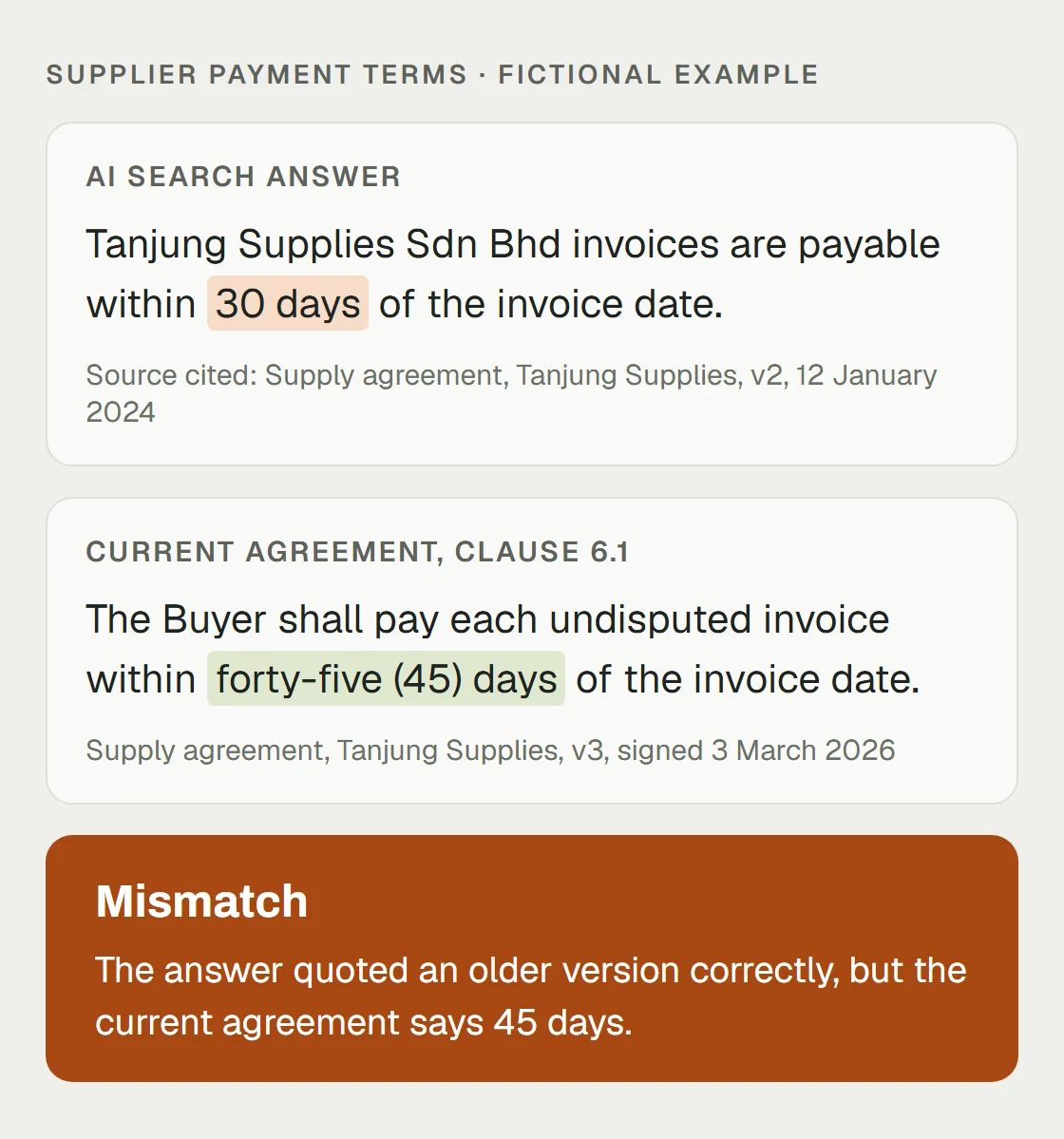
In the example, a finance officer asks for the payment terms of a supplier, Tanjung Supplies. The answer says 30 days and cites the supply agreement.
If you cannot find the passage, treat the answer as unsupported and leave it out of the record.
Confirm the document is the current version
A search tool can only answer from what it has been given, and shared drives often hold drafts, superseded contracts and personal copies alongside the signed version. Check the date, version and status of the document the answer used, then look for a later one.
| Document | Date | Status | Payment terms |
|---|---|---|---|
| Supply agreement v2 | 12 January 2024 | Replaced | 30 days |
| Supply agreement v3 | 3 March 2026 | Signed, current | 45 days |
The answer quoted version 2 correctly. It was still wrong for today, because version 3 replaced it.
Check each figure, name and date
Compare every specific item in the answer with the current source: amounts, dates, names, units and percentages. These are the details people act on, and the details a summary is most likely to round, merge or leave out.
| In the answer | In the current source | Action |
|---|---|---|
| Payment terms 30 days | 45 days, clause 6.1 | Correct before use |
| Tanjung Supplies Sdn Bhd | Tanjung Supplies Sdn Bhd | None, it matches |
| No mention of late payment | 1.5% a month after the due date, clause 6.3 | Add to the record |
The third row matters as much as the first. An answer can be accurate and still leave out a condition the record needs.
Record what you checked
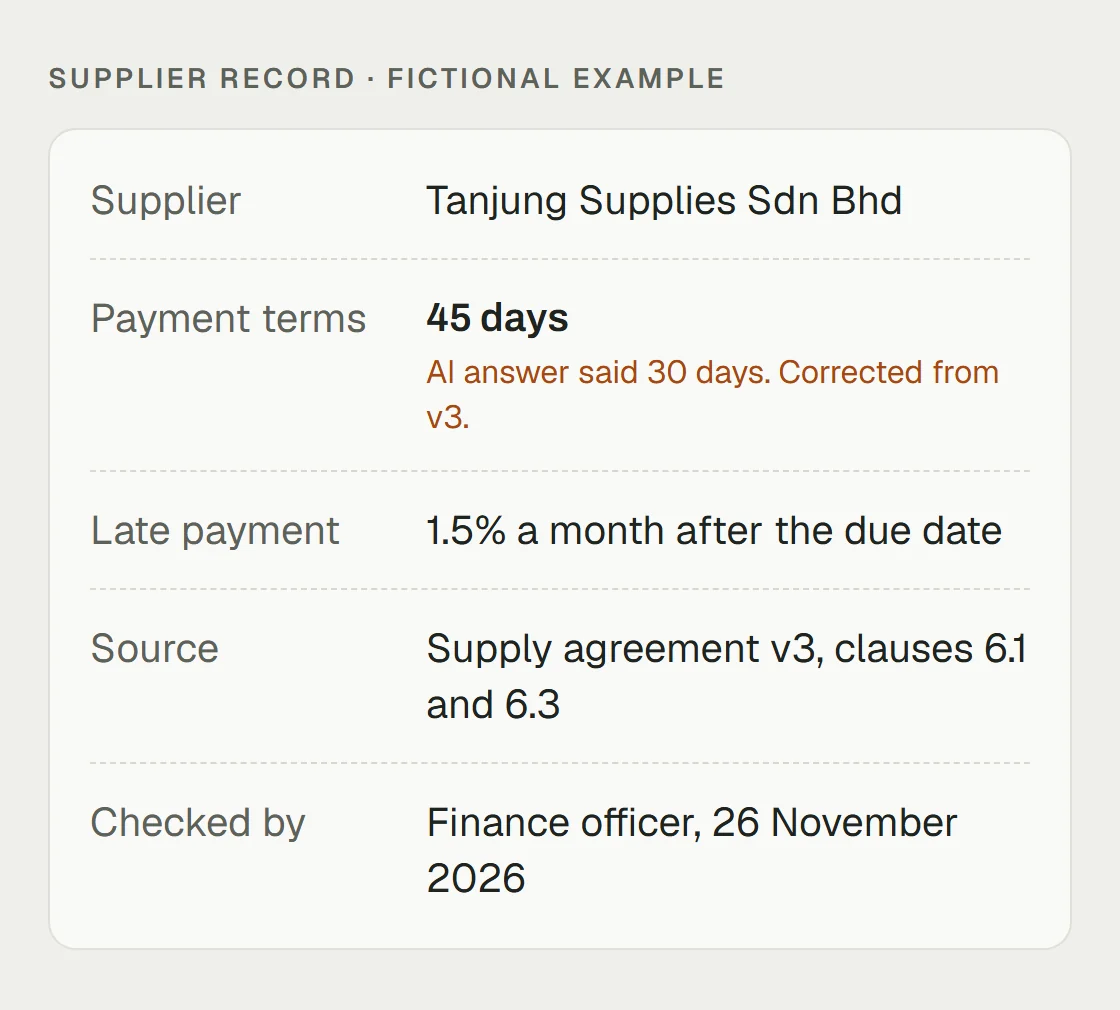
When you enter the figure, note where it came from: the document, its version, the clause, who checked it and when. The next person can then confirm the record from the source without repeating the search.
What these checks do not cover
These checks confirm that a record matches a source document. They do not show that the source itself is correct, and they cannot find a document the search tool was never given. For terms with legal or financial weight, the person responsible for the agreement should confirm the figure.
Build the checks into your process
Where the same kind of answer is checked many times a week, part of the work can be built into the application your team uses. Examples include showing the source passage beside each answer, marking documents that have been replaced, or asking a reviewer to confirm a figure before a record is saved. If you are planning a process like this, contact us to discuss which checks your records need.